
You're Probably Using the Wrong AI Model
Many tasks need a fraction of the processing, cost, and environmental footprint you're burning

[This article is part of my “Mastering your AI Footprint” series on generative AI — its impacts on the world, and how to use it in ways that reduce its financial and environmental costs.]

My electric vehicle has three core driving modes: Eco, Normal, and Sport. The difference in acceleration and power (and thus battery drain) is noticeable.
AI models have power tiers also. But the difference between them is not like EVs — maybe a 15-20% power increase — but far higher. The highest tier often costs 5 or more times the lowest, and thus takes a lot more processing and energy.
And just like you don’t need sport mode to pull out of your garage, in everyday AI use, most of us don’t need the highest tier.
The big 3 of generative AI — Anthropic’s Claude, OpenAI’s ChatGPT, and Google’s Gemini — each offer roughly three power tiers. Below I share a graphic of the simplest way that I can understand it, with the help of the models partly explaining themselves. The names are not always crystal clear: the lightest levels are Haiku, Instant, Flash, and the heaviest are Opus, Pro, Pro.
The labels are also in flux. Google’s Gemini renamed Fast to Flash between when I drew the chart below a few days ago and when I finished writing this. There are nuances and more specific models you can (sometimes) choose within each brand. But the structure is roughly consistent: light, middle, heavy.
Quick note: the terms around AI can be overlapping and confusing. The word “model” can refer to the brands of Claude or ChatGPT, or these specific levels within each, or sometimes numbered models (ChatGPT has 5.5, 5.4, 5.3, etc.). I’m choosing to use tier here to indicate the three levels with each model/brand.
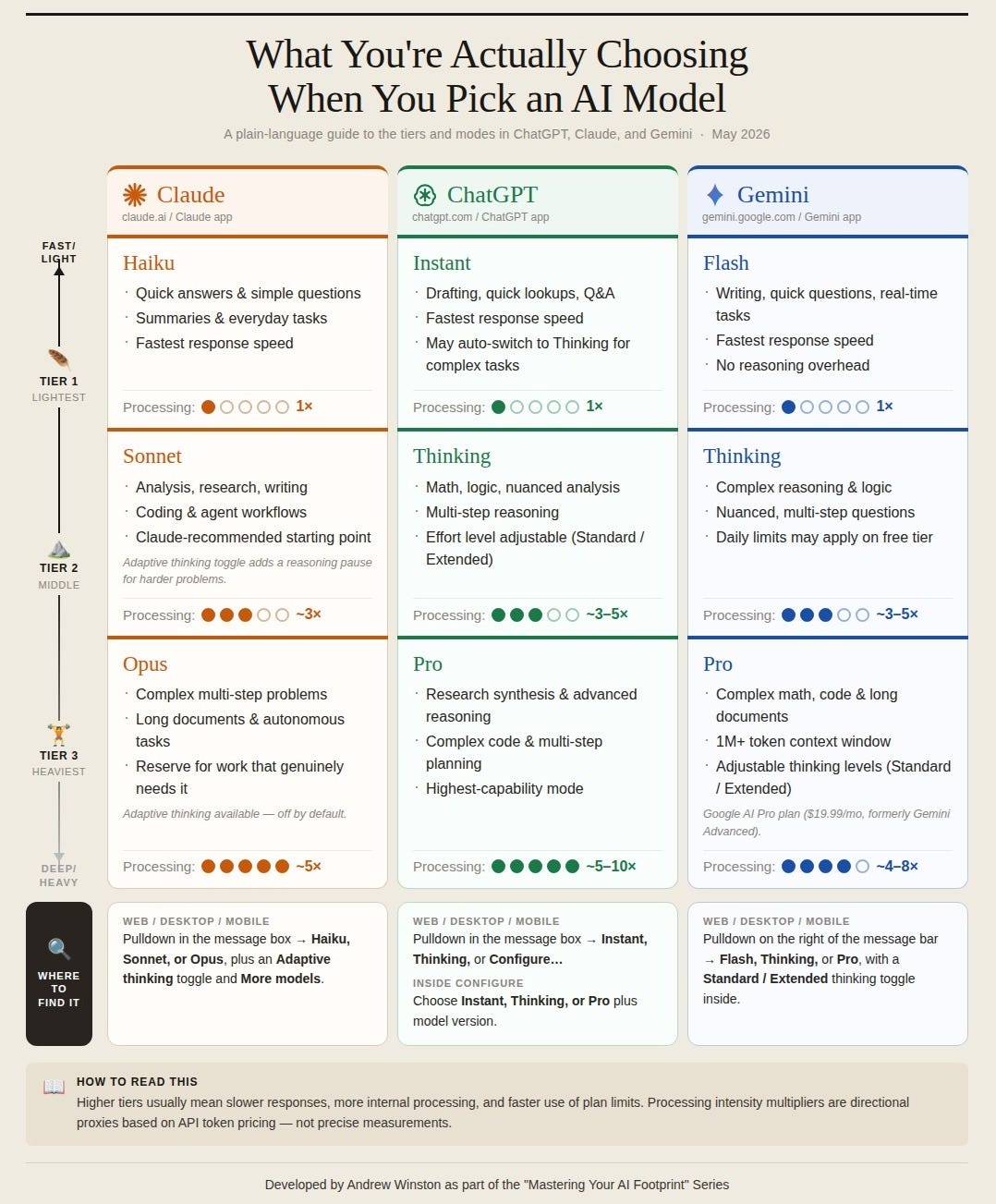
My goal here is to help people choose the path with less processing cost and energy use whenever possible. Here’s the problem: these companies do not publish specific numbers on these things (imagine buying a car with zero data on power or mpg). Google last year estimated the watts per query. (It was 0.24 per text prompt, or 9 seconds of TV watching, which means what, exactly? I really don’t know.) This kind of data is only so useful since (a) the discussions you have with AI can vary dramatically in their demands and by the choice of tier (the point of this article) and (b) usage is measured not in queries but tokens (please see my glossary for key terms).
Big Differences in Power and Cost between Tiers
So, I’m using as a proxy for processing intensity what the providers actually charge enterprise customers per million tokens. It varies a lot. An AI data analytic firm, Silicon Data, ran the numbers across ChatGPT's full model range, which can be heavier and lighter than what most consumers see. Costs for the same workload varies from $1,300 to just seven dollars! The tiers in the chart above show a less dramatic range, but 5 to 10x is big enough to warrant some attention.
As you use different tiers, you can tell the difference by how long the tiers take to process. In speed tests on the same tasks Claude’s Haiku takes about half as long as Sonnet, which takes half as long as Opus.
Let’s make this even simpler and visual. If you ask AI a question on the highest tier, with no other adjustments, it's like turning on five light bulbs for some amount of time versus just turning on one. It’s critical to think about whether you really need the extra power.
And while it’s great to know that one choice is 3 or 5 times more processing, for now, we don’t know exactly what the base tier (or what i’m calling “1x”) uses. Google has just announced that its refreshed search engine runs on Gemini Flash (which also shows that just ‘not using AI’ is going to be really difficult). So a “1x” load is what you get on a typical search today.
Of course the models tell you to start in the middle and the default for Claude is usually Sonnet but I'd suggest experimenting and seeing what you get. The 1x tiers are likely fine for a great deal more than they’d admit.
What Tier Should You Use?
So, the 64-million-token question is: which tier do you actually need.
Here's the mental model I find most useful, borrowed from Claude: "It may not be best to think of it as simple vs. complex, but instead ask, how much does a reasoning error cost me?"
This admission from a model is interesting. It’s saying that less processing means more likely errors. So think about whether the perfect right answer is critical, or directional info for you to build on.
Here are some examples of the kinds of prompts you might use for both personal use (going on vacation to Paris) and professional (looking at some key financial data at work).
Tier 1 (Lightest - Haiku, Instant, Flash)
Use for low-stakes recall: fast, factual, bounded questions where you need a clean answer, not discernment or nuance.
“What metro line goes to the Musée d’Orsay?”
“What is the standard formula for calculating Days Sales Outstanding, and can you give me a quick Excel formula?”
“Define ESG reporting frameworks — GRI vs. SASB vs. TCFD in one sentence each.”
Why: Pure retrieval. No synthesis needed, like a Google search. Using higher tier Sonnet here would be, as Claude put it, “like taking a cab to your mailbox.”
Tier 2 (Middle — Sonnet, Thinking, Thinking)
Use for tasks that require some context and judgment, require multiple steps of reasoning or searching, or have some constraints…but where you’re not trying to take in a huge number of sources or data.
“I have two days in Paris in June, staying near Le Marais. Draft an itinerary — museums, food, one day-trip option — that avoids the obvious tourist traps.”
“Here’s my Q1 P&L. Explain why there seems to be margin reduction and flag any line items that look off vs. typical benchmarks.”
“I’m auditing travel expenses against our corporate policy. Walk through these line items step-by-step and flag exactly which policy rules were violated.”
Why: These tasks require real intelligence like understanding neighborhood proximity, opening days, conditional logic (”if the museum is closed Tuesday, shift it to Wednesday”), and pattern recognition against domain knowledge. This middle tier likely handles the bulk of today’s professional work at meaningfully lower cost than Tier 3. Most providers set this as the default, but you should experiment. Try some things on tier 1 and 2 and see what you get.
Tier 3 (Heaviest — Opus, Pro, Pro)
As Claude put it: “Reserve for synthesis across many sources, long documents, or compounding decisions where an early reasoning error cascades.”
“Compare the visitor experience at the Louvre vs. Musée d’Orsay vs. Centre Pompidou — drawing on recent reviews, wait times on these dates, ticket pricing, and what critics say about the collections — and tell me which is worth limited time given I’m primarily interested in 19th-century European painting.”
“I’m attaching three years of P&Ls, our client concentration breakdown, and two analyst reports on the sustainability consulting market. Where should I be investing vs. cutting — and what’s the 18-month scenario if ESG spending softens?”
“Analyze our quarterly P&Ls alongside these earnings call transcripts. Identify the drivers behind Q3 margin compression — specifically, does the executive commentary about supply chain costs match the actual COGS spike? Synthesize a 4-page executive briefing for the board.”
Why: You’re asking the model to hold large amounts of data simultaneously — spreadsheets, transcripts, multiple documents — find the narrative threads, and generate reliable analysis where being wrong has downstream consequences. That’s when the top tier earns the investment.
Finally, there’s one more layer to all of this worth knowing: the big brands also offer extended or adaptive thinking. It may be a toggle that adds a deliberate reasoning pause before answering. It's useful for genuinely hard problems. It also adds an unknown amount of time and processing, but doubling wouldn’t be a bad bet. Use it when the problem earns it.
Concluding thoughts
No matter what AI does for you, the results are on you, especially at work. Discovering the Louvre was not actually open at noon is relatively low stakes (so have AI gather all the links you need and check it). Getting quarterly data wrong with the CEO is not. All of this is really about speeding things up for you and narrowing the possibilities before you spend some of your own internal CPU time finalizing.
I’ll come back to “using AI wisely” in later articles. My view is that we should use this powerful tool in a way that doesn’t replace our learning and development. You may want to do some of what the highest tier does by yourself, or with a small team, after gathering good data.
For now, I just wanted to convey this simple idea that the tier you choose can radically increase or decrease the resource use and footprint of AI. The default for most providers is the middle tier. I'd suggest experimenting downward first. But note: if a lighter tier gets it wrong and you re-run it multiple times, you may have used more energy than one clean Sonnet run. The goal isn't always "lightest" but what’s appropriately matched to the task.
Just like you don’t need Sport mode to go to the mailbox, most of us don’t need to fire up the highest AI tier for most questions.
The footprint implication is real, even if we can’t get the exact numbers. Yes, the so-called “hyperscalers” building gigantic datacenters are making infrastructure decisions that dwarf any individual’s model or tier choices. But inference, the day-to-day use of AI, is the sum of all its parts. Every individual, every small business, every person using AI in their personal life makes these choices constantly. That logic applies to essentially all environmental action: nobody’s decision to buy an EV moves the needle alone, but billions of them do. This is no different.
Choose wisely.
The Mastering Your AI Footprint series:
Overview/Pre-quel
The Serious Problems with AI
Focus on Energy (Coming soon)
Focus on Social Impacts (Coming soon)
Using AI Efficiently
Focus on Prompting for efficiency (Coming soon)
Using AI Wisely
Focus on when not to use AI (Coming soon)
Focus on enhancing what’s uniquely human, and not anthropomorphizing AI (Coming soon)
Interesting perspective. The point about matching the right AI tool to the right kind of work really stands out.